


SameMovie Disney+ Video Downloader
Download any Disney+ movies and shows in 1080P with Dolby 5.1 or AAC 2.0 audio. Save as MP4/MKV and enjoy offline playback on any device, anytime, anywhere.

10X Download Speed
Smart Acceleration Technology

1080P Resolution
Crystal-Clear Quality

Batch Download
Download different Disney+ movies at a time.
*Note: It's for personal use only.
Your Ultimate Tool for Expanding Your Disney+ Video Library
Discover the user-friendly method for downloading unlimited videos from DisneyPlus.com.

Download Any Disney+ Movies Without Limits
Whether you're a fan of the heartwarming stories and stunning animation of Pixar films or the timeless magic and enchantment of Disney movies, SameMovie Disney+ Video Downloader lets you download all types of Disney+ movies without limits and keep them forever.
- Works with Any Subscription Plan: No matter which subscription plan you're on, you can easily download any Disney movies, series, originals, and anime with SameMovie.
- Supports Disney+ & JioHotstar: Seamlessly download from both Disney+ and Disney+ Hotstar with one program, expanding your watching libraries.
- Download Popular Titles: Download FHD Pixar, Star Wars, Marvel, Disney Movies, and anime titles on your PC/Mac, and watch anytime.
Save Disney+ as MP4/MKV Files, Watch Them on Any Device
Disney+ official apps come with several download limitations. One of them is that downloaded titles can only be played within the app and cannot be transferred.
Luckily, SameMovie Disney+ Video Downloader removes this restriction. It lets you download Disney+ movies, shows, and anime as MP4 or MKV files on your Windows PC or Mac. Once downloaded, you can transfer them freely to a USB drive, and watch Disney+ movies on any device, including laptops, mobile devices, Switch, PS4, TVs, and more.


Save High-Quality Disney+ Movies with Dolby 5.1 Sound
Unlike many other downloaders, SameMovie never compresses video quality. It downloads all Disney+ movies, shows, anime and Disney+ Hotstar in 1080p, ensuring your watching experience is clear on any device.
Even better, it saves Disney movies with Dolby 5.1 sound. Whether it is the big scenes of Marvel or Star Wars, SameMovie surely keeps the original crystal-clear dialogue, surround sound effect, and master-quality sound identical to the official streaming version.
Enjoy 10X Faster Batch Downloads for Disney+ Movies
SameMovie uses hardware acceleration and advanced technology to deliver a better downloading experience. Now, with the latest version of the Disney Plus Video Downloader, you can get:
- 10X Faster Downloads: Download an entire TV episode in just 10 minutes or a full-length movie at 10 times the speed.
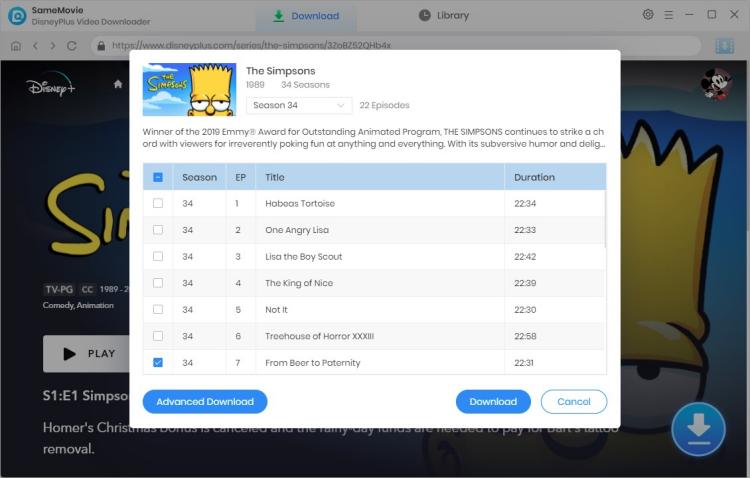
- Batch Download: Add a whole season to download & add or remove videos from the download queue at any time.
- High Success Rate: Boasts an exceptional success rate of almost 100%, enabling you to obtain your desired downloads quickly and without the need for repetitive processes.


Watch Disney+ Movies Ad-Free - even with the Basic Plan
Tired of endless ads before playing Disney+ movies every time, but don't want to upgrade? No problem! SameMovie Disney+ video downloader comes in.
Even if you are with the basic Disney+ plan, SameMovie can get rid of Disney+ ads and download only the movie content, ensuring your downloaded files are clean and ad-free. Thus, you no longer have to endure ads and can smoothly enjoy Disney+ movies without any interruption.
Preserve Multilingual Subtitles & Audio Tracks in Disney+ Movies Easily
SameMovie offers flexible options to customize your viewing experience, ensuring you enjoy Disney+ content exactly the way you want.
- Dynamic Audio Selection: Choose from various audio tracks of different qualities and languages.
- Flexible Subtitle Modes: Save subtitles as Internal, External (SRT/VTT), or Hardcoded files.
- Multilingual Subtitles: Select subtitles in different languages and watch Disney+ movies in the way you like.
Plus, SameMovie goes far beyond just downloading videos with subtitles. It also supports extracting audio or subtitles and downloading audio or subtitle files only.

Discover More Perfect Functions

Built-in Disney+ Browser
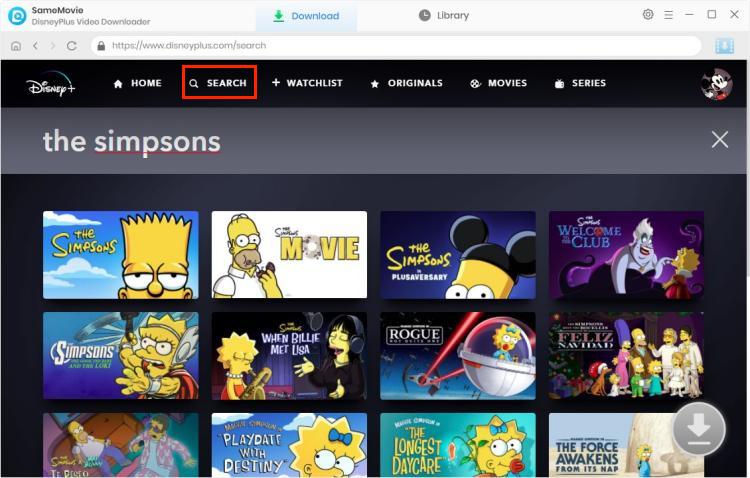
Within the built-in browser, you can freely search for and watch your favorite Disney+ movies, shows, and anime.

Preserve Disney+ Metadata
Completely preserves the titles, genres, tags, and duration of downloaded Disney+ movies and shows.

H.264 & H.265 Support
Freely choose your video codec — H.264 or H.265 — optimizing your video downloading experience.

Multi-Language Support
SameMovie offers 25 different languages, catering to users who speak different languages.

SRT/VTT Format
SameMovie allows you to extract subtitles in SRT or VTT format, giving you more control and flexibility over subtitles.

Ad-Free UI
The program is completely ad-free, ensuring a safe and smooth downloading experience.
Why you need Disney+ Video Downloader?
Download Disney+ movies or shows, then stream on any device, anytime, anywhere.
Enjoy Disney+ Anywhere, Even Without An Internet Connection
Commuting on the subway or traveling on a plane and want to watch Disney+ movies but have no internet? Download Disney+ movies, shows, and anime with SameMovie and watch them offline anytime, anywhere.

Break Disney+ Download Limits And Keep Your Videos Forever
The premium plan allows downloads, but with limits such as up to 25 titles per account and 10 devices, and downloads expiring after 30 days. SameMovie removes Disney+ downloading limitations, allowing you to download Disney+ movies on any device and keep them forever.

Download Disney+ Movies From Any Region Without Limitations
With SameMovie, you can easily download Disney+ movies and shows from different regions, including the US, FR, JP, DE, India, and others, and watch them anywhere.


Why Choose SameMovie

98% Success Rate
Multi-Language

Clean UI

Customizable

Clean Experience

24/7 Support

What people say about us
Check out complete Reviews of SameMovie Disney+ Video Downloader >>
I've tried several Disney+ downloaders, and SameMovie is by far the most stable one. The download speed is fast, and the video quality is excellent. I can finally watch my favorite shows offline without any issues.
What I like most is the flexibility. I can save videos as MP4 and play them on any device, even on my TV and tablet. The subtitles and audio options are also very helpful.
Super easy to use. The built-in browser makes everything simple, and I don't have to deal with ads or playback limits anymore. Definitely worth it if you watch Disney+ a lot.
How to Download Disney+ Movies with SameMovie
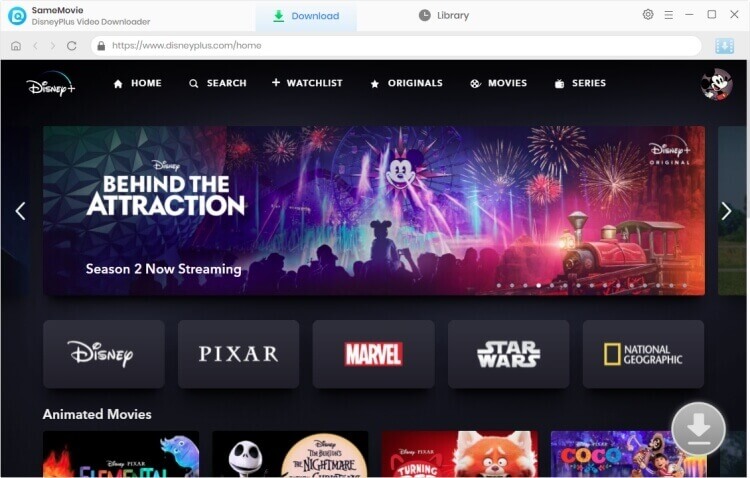
Step 1: Run Disney Plus Video Downloader
Step 2: Customize Output Settings
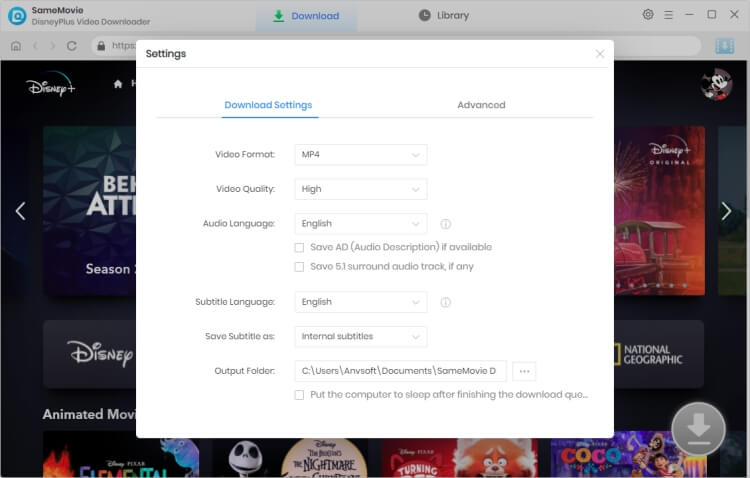
Step 3: Search for Streaming Videos
Step 4: Select Output Audio Track and Language
Step 5: Start to Download
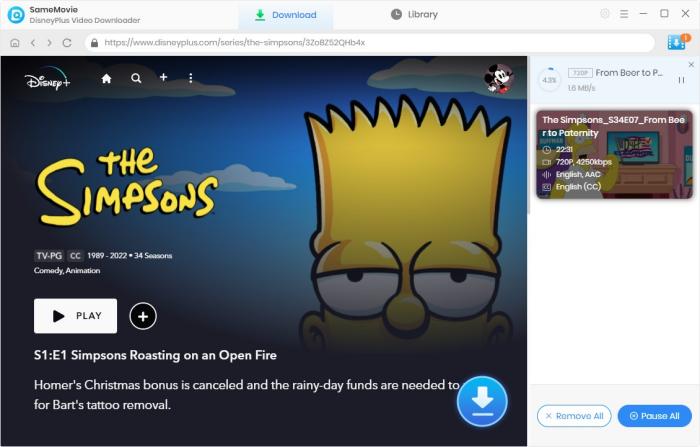
(For more detailed tutorial, please refer to Online Help.)