


SameMovie Netflix Video Downloader
Download Netflix movies and shows to computer more flexibly, while saving full HD quality, original Dolby Atmos/5.1 audio, and multi-language subtitles.

10X Download Speed
Smart Acceleration Technology

1080P Resolution
Crystal-Clear Quality

Batch Download
Download an entire Netflix season at a time.
*Note: It's for personal use only.
Download Netflix Movies & Shows Offline, Binge-Watching Without Limits
Best Netflix Video Downloader Trusted by Millions of Users Globally

Download Unlimited Netflix Videos , Keep Your Favorites Forever
You know what? For Netflix Standard and Premium plans, you are limited to downloading 100 titles per device, while only 15 videos can be downloaded per month for ad-supported plans. Meanwhile, once playback begins, you will get only 48 hours to finish before it expires. So in fact, you have less control over your downloaded videos.
Now, with SameMovie Netflix Video Downloader, you can download any Netflix movies to your Windows or Mac, whether for Netflix movies, TV shows, originals, anime, documentaries, etc. No more download limits and save them forever. Now, give SameMovie a try, and Netflix on any device, anytime, anywhere.

Netflix Never Expire

Download All Titles

Watch on
Multiple Devices
Download Netflix Video to MP4/MKV in Full 1080P High Quality
Use SameMovie to download Netflix videos in up to full HD 1080P with no quality loss. You can enjoy every frame in crisp detail, vibrant colors, and smooth playback!
It also supports to download Netflix titles as MP4 or MKV files, so you can transfer and watch them freely on any device, from a laptop and media player, smartphone, tablet, smart TV, game console, or even in - car systems.
- Save True HD Quality – Watch Netflix movies on big-screen TVs without any quality loss.
- Choose Best Codec – Select H.264 for broad device compatibility or H.265 for better quality at smaller file sizes.
- Watch Netflix Anywhere Offline – Enjoy offline Netflix on any device without buffering or interruptions. It's perfect for commuting or
long trips.


Batch Download Netflix Videos – at 10X Faster Speed
You can add multiple Netflix movies or series to SameMovie's task, and it will batch download all titles at 10X faster speed. It works on your computer background, so you don't need to record Netflix shows at real-time.

Full Season Download
Download an entire Netflix season at a time, no need to grab episodes one
by one.

Multiple Titles at Once
Add multiple movies or shows to the list, and download them at once in computer background.

Video, Audio, Subtitle
Separate Downloads
Download video, audio, or subtitles individually, giving you full control over your files.

Hardware Acceleration for
Faster Downloads
With hardware acceleration enabled, it will use your computer's CPU and GPU to download videos faster.
Remove Netflix Ads, Binge-Watch
Without Interruptions
Netflix's basic ad-supported plan forces you to sit through ads before watching. But SameMovie changes that. Even if you're using Netflix's cheapest ad-supported plan, this tool allows to download all Netflix content in an ad-free and pure version. It's awesome!
- No Interruptions During Playback – Enjoy Netflix streams without pre-roll or mid-roll ads breaking the flow.
- Stay On Ad-Supported Plan – No need to upgrade Netflix Premium or Standard (No Ads) plan to enjoy ad-free movie streaming.


Keep Netflix Dolby Atmos/5.1 Audio & Multi-Track
Not just simple screen recordings — SameMovie can also download Netflix's native audio in full (up to 768kbps), including Dolby Atmos (Spatial Audio) or Dolby Digital 5.1 Surround Sound. Copy Netflix downloads to your TV set, then enjoy cinema-grade, IMAX-level immersion at home.
On top of that, you can even choose multiple audio tracks in different languages on SameMovie, so that you can enjoy Netflix exactly the way you want.
Advanced Subtitle Options – Three Modes to Fit Every Need
SameMovie lets you take full control of subtitles with three types:
- Internal Subtitles – Multiple languages saved inside the video file. During playback, you can turn on or off the subtitles, or choose the languages you need.
- External Subtitles – Subtitles downloaded as separate .srt/.vtt files. It's perfect if you wanna edit or share the subtitles you love.
- Hardcoded Subtitles – Original subtitles fully burned onto video. Download TTML-image subtitles, you can watch Netflix's subtitles as they appeared on originals.
No matter what language the original Netflix video is in, you can fully download them with these three types of subtitles, ensuring you never miss a line, a joke, or a plot twist, and enjoy Netflix your way!

Discover More Perfect Functions

Resume Download
Easily pause your Netflix downloads and continue later without starting over.
It's life-saver.

Built-in Netflix Web Page
Sign in and browse Netflix Originals or search for any title directly in the built-in browser — no app-switching needed.

Preserve Audio Description
Save Audio Description tracks for full access to Netflix content and complete visual understanding.

Retain Video Metadata
Store Netflix metadata including titles, genres, tags, and duration for easy download management.

Set System to Sleep
You can choose set computer to sleep once your download is complete. No need to manually turn it off.

Free Upgrade
Enjoy lifetime updates after purchase. SameMovie keeps improving features and performance for free.
Why you need Netflix Video Downloader?
Download Netflix movies or shows, then stream on any device, anytime, anywhere.
Download Netflix Movies on Laptop,
Watch on Bigger Screen
Netflix no longer supports downloads on PC & Mac , but with SameMovie, you can download Netflix movies and shows on laptops and enjoy them offline anytime, anywhere.
👍 Save Netflix Movies to Your Laptop in Full HD

Download Netflix Video from Any Region,
No Limits
When you get "This title is not available to watch in your area" error on Netflix, you are blocked by Netflix's region limitation. But now, with SameMovie, you can download any global Netflix shows and watch them without any issues.
🌍 Unlock & Download Netflix Titles from Any Country

Watch Netflix During Traveling Or During Flights,
No Wi-Fi Needed
Long flights or weak internet? Use SameMovie to download Netflix movies onto your phone or laptop. After that, you are able to stream them on a plane.
✈️ Watch Netflix Offline, Anytime, Anywhere

Watch Netflix Without App, Stream in Your Way
When you get Netflix MP4 files, you can transfer them to any device, like a smart TV, game console, or portable video player. Then play them outside Netflix app without restrictions.
👍 📱 Watch Netflix Anywhere, No App Needed


Why Choose SameMovie

98% Success Rate

Multi-Language

Clean UI

Customizable

Clean Experience

24/7 Support

What people say about us
Check out complete Reviews of SameMovie Netflix Video Downloader >>
It's working properly on my laptop. Now I can finally download some old movies and move them to TV! I'll give it 5 stars because this app is truly helpful. It is strongly recommended to use on your laptops.
Only had it for a short while but so far it's perfect! It also has an fantasitic function called "Advanced Download" which shows options of quality, size and subtitles. That is so friendly for video editors like me.
This app is awesome! It's just flawlwssly and its performance exceeded my expectations! I am able to download any videos on laptop, and even import the videos to my car player. Honestly, this app will never let you down.
How to Download Netflix Movies to Watch Offline with SameMovie?
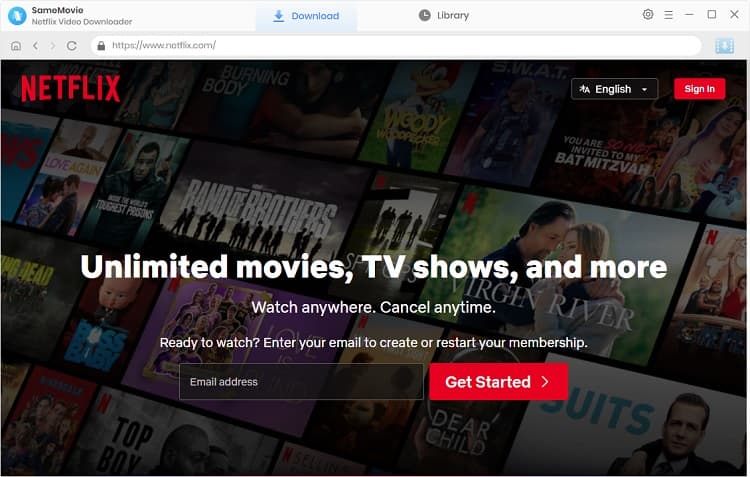
Step 1: Run SameMovie Netflix Downloader and sign in with your Netflix account
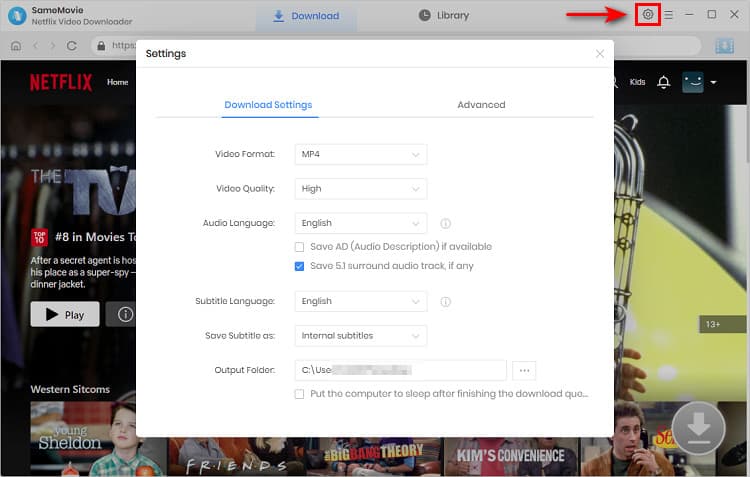
Step 2: Click the Gear icon to access the Settings windows and change the output settings
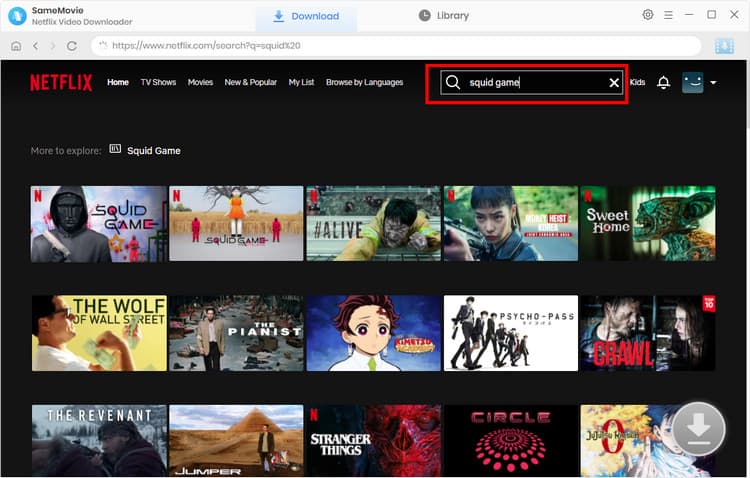
Step 3: Enter keywords to search for Netflix originals, shows, and more
Step 4: Select your desired video quality, audio tracks, and subtitles
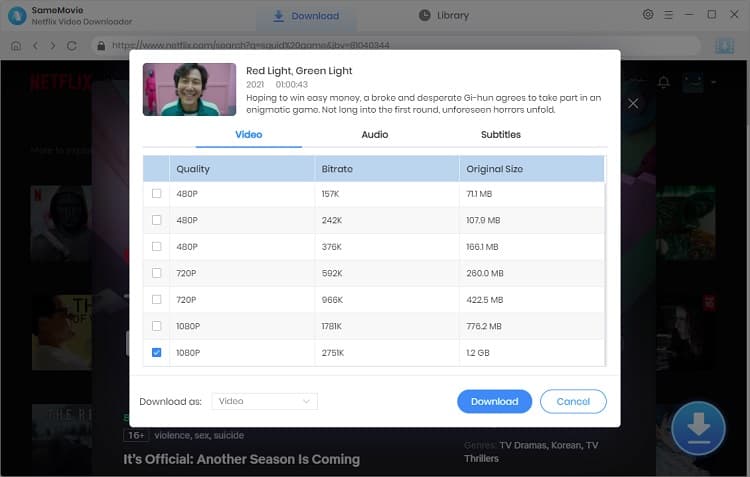
Step 5: Click "Download" to start downloading 1080P Netflix movies
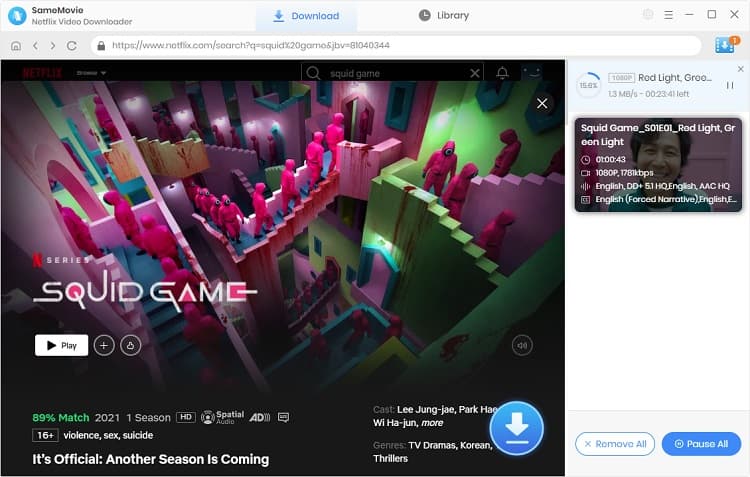
(For more detailed tutorial, please refer to Online Help.)
FAQs about SameMovie Netflix Downloader
Yes, it is generally safe to use if you download it from the official website. It is a desktop application with no ads or bundled software. However, please note that the tool is intended for personal offline viewing only. Users should follow Netflix’s Terms of Service and local copyright laws when using downloaded content.
Yes. SameMovie Netflix Video Downloader offers a free trial that lets you test its features before purchasing. You can download the first 5 minutes of each video during the free trial.
SameMovie Netflix Video Downloader is designed specifically for downloading videos from Netflix. SameMovie Video One is an all-in-one tool that supports Netflix and many other streaming platforms, including Amazon Prime, Disney+, HBO Max, Hulu, YouTube, TikTok, and Facebook. It also includes a recording feature that allows users to capture videos from streaming websites.
Yes. It supports multiple subtitle options, including internal, external (SRT/VTT), and hardcoded subtitles depending on your settings.
Yes. SameMovie supports downloading Netflix videos as MP4 or MKV files. You can select MP4 as the output format before downloading.
Hot Topics & Tutorials


![Can I Watch Netflix on a Plane? [Full Guide for Travelers]](/assets/img/blog/watch-netflix-on-plane.jpg)

![How to Download Netflix Movies to MP4 [Full Guide]](/assets/img/blog/download-netflix-video-to-mp4.jpg)